From connected to confident.
Bring in your portfolio, read your Daily before the open, test every idea, and trade only what you confirm. Here is each step, and what Thetix can and cannot do along the way.
- Read-only connection
- Your assets never move
- Nothing trades unless you place it
- Cancel anytime
Connect
Bring in your portfolio, your way.
Connect a brokerage read-only, or start without connecting anything. Either way Thetix works on what you actually hold.
How your connection is securedRead-only · 80+ brokerages
Connect your brokerage
Thetix syncs positions, cash, cost basis and history. Trading stays off until you turn it on for an account. Revoke access anytime.
- Schwab
- Fidelity
- Robinhood
- E*TRADE
- Interactive Brokers
- Public
- Questrade
 Schwab
 Fidelity
 Robinhood
 E*TRADE
 Interactive Brokers
 Public
 Questrade
Nothing to connect
Start from a screenshot or by hand
Paste a screenshot of your positions or type your holdings. You still get ideas, analysis and monitoring.
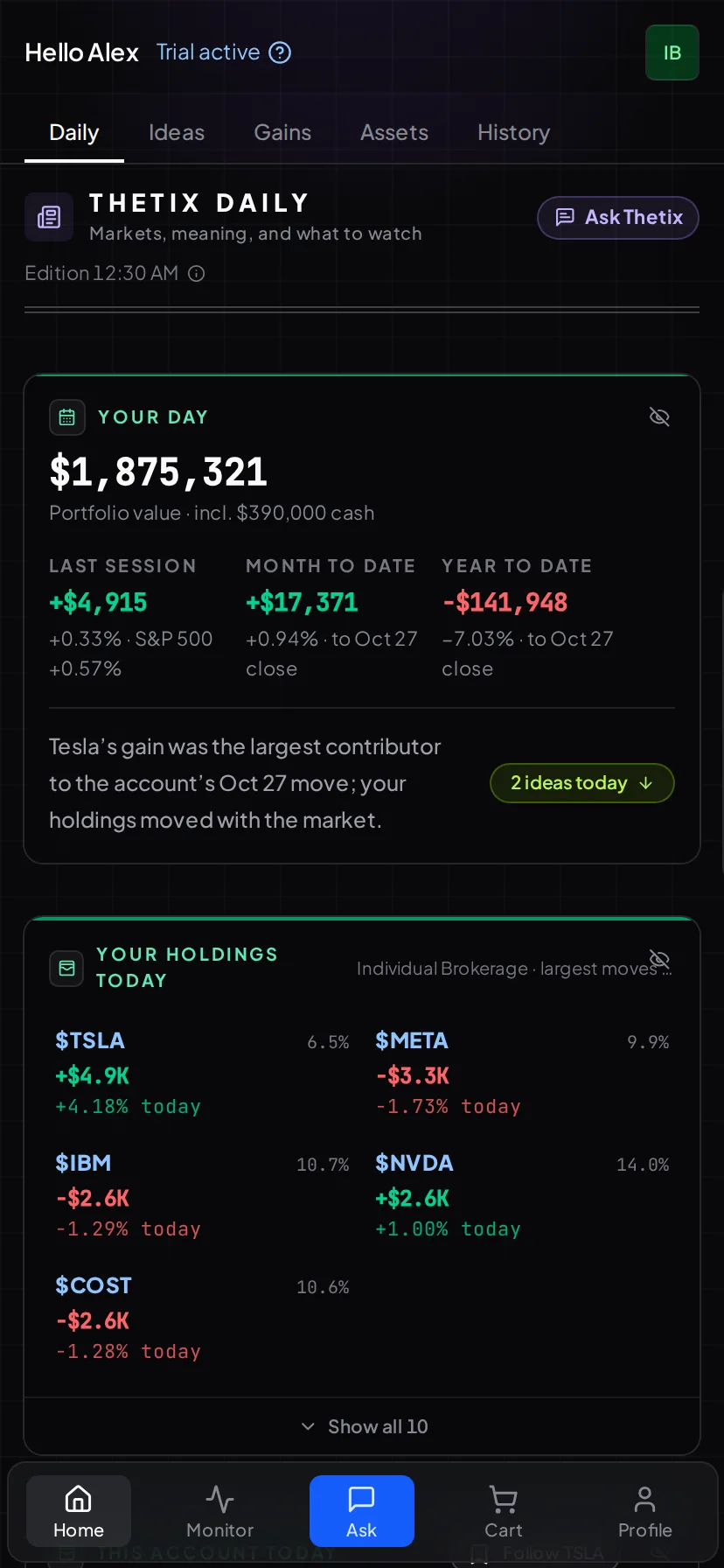
Your Daily
Ideas arrive before the open.
Overnight Thetix computes a fresh set of ideas, ranked against your holdings, your trading history and your risk profile, and writes them into your Daily.
- Income: Covered calls on shares you own and cash-secured puts on cash you hold
- Growth: New names worth researching, sized to your cash
- Fix-it: Rolls, concentration flags and underused holdings
Review
Stress-test every idea before you act.
Open the full analysis behind any idea, ask follow-up questions, and see how the trade behaves if the stock rallies, falls or reports earnings.

Ask
Bring your own ideas. Explore them live.
The Daily is one way in. Ask Thetix about any trade you already have in mind, and it computes the answer on your positions.
- Should I sell a $155 call on my PLTR for June expiry?
- Compare the $170 NVDA call vs $175, which has better risk and reward?
- What if AMD drops 15% before my call expires, where do I stand?
- Walk me through a collar on my 200 AAPL shares
- Build a put spread that hedges my tech exposure for under $500
- How would a $440 cash-secured put on SPY affect my cash buffer?
- If I rotate MSFT into GLD, how does my sector concentration change?
- Show me IV rank and historical volatility for TSLA right now
Try the live demo portfolio right after sign-up—no card or brokerage required.
Trade
You confirm. Then it’s placed.
Nothing trades automatically. Stage ideas in a cart, choose the account, and review every order before anything is sent.
- Multi-leg orders previewed with per-leg Greeks, live pricing and the payoff
- Confirm and send on supported trading brokers, or place it yourself at any broker
- Order size caps, a daily limit you set, and a two-minute hold after the open


Recover
When a trade goes against you.
Drawdowns happen. Thetix lays out the ways back, with every alternative priced, so the next decision is a better one.
Assignment risk: roll or accept?
When a call goes in the money near expiration, Thetix compares rolling with being assigned, projects break-even over time and weighs the trade-offs.
Drawdown: a defense playbook
Down 20%, 30% or more? Explore covered calls, collars and basis-reduction paths, with projected break-even and premium for each.
Monitor
Build your own board in plain English.
Describe what you want to watch and Thetix builds the card, keeps it current, and alerts you when a condition you wrote is met.

Security and data
Connecting real brokerage data is a trust ask. Here is what we do with it.
Read-only by default
Thetix views your positions, cash balance and transaction history. It never moves funds or changes account settings, and it places an order only after you authorize trading and confirm it.
Encrypted by design
Connections use OAuth 2.0, the standard banks and major platforms use, with 256-bit encryption on every request. Thetix never sees or stores your brokerage password.
Your data, your control
Your portfolio data is never sold. No advertising, no third-party sharing. Delete your account and its data at any time.
What Thetix can see and do
- Your current positions and share counts
- Your cash balance on each connected account
- Your transaction history and cost basis
- Realized and unrealized P&L
- Account labels and types you choose to share
- Place the orders you review and confirm, never automatically
What Thetix cannot do
- Transfer or move funds in or out of your account
- Change account settings or connection permissions
- Access your brokerage username or password
- Place a trade you did not confirm
- Auto-trade or act on its own
- Share your data with advertisers or third parties
Questions
Anything else: [email protected]
- Which brokerages can I connect?
- More than 80, including Schwab, Fidelity, Robinhood, E*TRADE, Interactive Brokers, Public and Questrade. Connections are read-only by default, with optional human-confirmed trading on supported brokers.
- Can I use Thetix without connecting a brokerage?
- Yes. Explore the demo account right after sign-up, or paste a screenshot of your positions and get ideas for your own holdings.
- How often are ideas updated?
- Every trading day. Thetix writes your Daily overnight so it is ready before the open, and you can ask about any position at any time.
- Can Thetix place trades?
- Only the orders you review and confirm, and only on an account where you turned trading on. Nothing trades automatically.
- Is Thetix investment advice?
- No. Thetix is analysis software. It computes ideas and shows its reasoning; every decision is yours.
- What does Thetix cost?
- One plan covers every feature: $99 a month, or $79 a month billed yearly, with a 14-day free trial. You can explore the demo account right after sign-up with no card required.
Start with the demo. Connect when ready.
- Read-only connection
- Your assets never move
- Nothing trades unless you place it
- Cancel anytime